db-agent
An open-source text-to-SQL AI agent for the modern lakehouse. Ask questions in plain English, get back validated SQL that runs against Databricks Lakebase, Unity Catalog, Postgres, MySQL, or Snowflake.
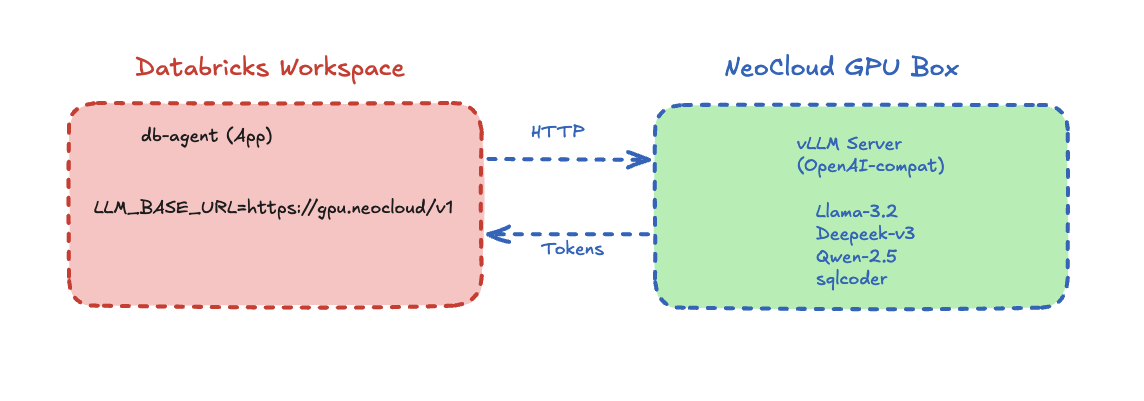
Presented at AAAI-25. Ships a Node.js/React app that deploys locally or natively to Databricks Apps, plus a pluggable LLM endpoint that can target any OpenAI-compatible inference server.
The live demo runs the Node.js app on Render against a bundled sample dataset (customers, products, orders) — ask in plain English, see the generated SQL and the rows it returned. Free-tier hosting: the demo sleeps after a few idle minutes, so the first question after a while may take 30-60 seconds to wake it up.
Multi-data-plane
Query Databricks Lakebase (Postgres OLTP), Unity Catalog Delta (OLAP), Snowflake, and MySQL through one schema-aware agent. Lakehouse Federation joins handled at the warehouse, not in the agent.
SELECT-only safety guardrail
Every generated SQL statement is validated before execution. Blocks DROP, DELETE, UPDATE, INSERT, ALTER, plus Databricks-specific OPTIMIZE, VACUUM, and ZORDER. Word-boundary regex avoids false positives.
Pluggable LLM endpoint
One env var (LLM_BASE_URL) points the agent at Databricks Model Serving, OpenAI, Azure, GitHub Models, or a self-hosted vLLM server on a neo-cloud GPU. Swap inference providers without touching application code.
How it works
A deterministic pipeline — five steps in order, no autonomous loops, no surprise LLM bills. Every question produces exactly one LLM call and one SQL statement.
Schema
Reads INFORMATION_SCHEMA across all attached data planes.
Prompt
Schema-first prompt template — types before query shape.
LLM
OpenAI-compatible POST. Returns structured JSON.
Validate
SELECT-only check. Blocks unsafe SQL before it runs.
Execute
Runs against the warehouse with a row-cap. Returns rows + SQL + explanation.
Quick start
Clone the repo and run it locally with Ollama — no API key needed — or deploy straight to Databricks Apps.
git clone https://github.com/db-agent/db-agent
cd db-agent/app

ollama pull qwen2.5-coder:7b
./run_local.sh

# open http://localhost:3001
# any OpenAI-compatible endpoint works instead of Ollama —
# see app/.env.example for OpenAI, Groq, and Databricks Model Serving
Want the end-to-end Databricks Lakebase + Unity Catalog walkthrough? Open the companion lab
From the maintainer
See the newest features built live — free webinar series
Redaction-first agent memory, S3 Vectors, knowledge files — the features that don't fit in a README, walked through live by the person who shipped them. No slides, notebook included, replay sent to every registrant.