AWS Workshop Lab Automation: IAM Sandboxing, Tag Cleanup, and Cost Allocation at Scale
How to run AWS workshop labs for real cohorts without the bill, the IAM errors, or the roster chaos, tag-driven cleanup, IAM sandboxing, and cost allocation tag backfill explained.
Optimizing Hands-On Workshop Labs: From Data Lake to Full-Stack
Running a live, hands-on cloud workshop looks simple from the outside: give each student an AWS login, point them at a lab guide, let them build. In practice, the moment you have more than a handful of students sharing infrastructure, three unglamorous problems show up every single cohort:
- Students need real cloud access without being able to blow up each other's work, run up an unbounded bill, or wander outside the lab's scope.
- Whatever they create needs to disappear on a schedule, without someone manually hunting through the console at midnight.
- You need to know what all of this actually cost, broken down by lab, not just a lump sum on an invoice at the end of the month.
None of these are novel infrastructure problems. What's less obvious is how much they compound when the same AWS account is shared across cohorts, across different workshop tracks (data pipelines, full-stack apps, security labs), and across months of history. Here's what we've converged on.
1. One shared sandbox policy, not one policy per student
The instinct when you first provision cloud access for a class is to scope IAM permissions tightly per student: separate roles, separate resource-name-based conditions, separate everything. We tried that. It's fragile and it's genuinely hard to debug when a student's perfectly reasonable action gets denied by an IAM condition nobody remembers writing.
What works better: one region-locked, service-scoped sandbox policy per cohort, attached to a single IAM group. Every student in that cohort gets the same permission boundary: access to the handful of services the curriculum actually uses, locked to one region, with zero ability to touch IAM itself. The one exception carved out is a single, narrowly-scoped PassRole permission onto a pre-created shared execution role, so students never need to create IAM roles of their own. That one shared role covers what the labs need (compute execution plus the specific data services in play) and nothing else.
The result: permission errors become rare and, when they happen, are easy to reason about, because there's exactly one policy document to check, not thirty.
2. Namespacing is a tagging convention, not an IAM rule
We used to try to enforce naming conventions at the IAM layer, matching resource ARNs against a student's assigned name prefix. It's fragile: one missed pattern and either legitimate work gets blocked or an escape hatch opens.
The fix was to stop treating naming as a security boundary and start treating it as a housekeeping convention enforced by tagging, not by IAM:
- Every resource gets a
workshoptag identifying which curriculum it belongs to. - Every resource gets an
autodeletetag,trueby default. - Every resource gets a
datetag for when it was created.
A nightly sweep then applies one rule, consistently, across every resource type in play (compute instances, functions, storage, CDN distributions, API gateways, databases, log groups, security groups): delete it unless it's explicitly tagged autodelete=false. No tags at all is treated the same as autodelete=true, on the theory that an untagged resource is far more likely to be an orphaned lab artifact than something worth protecting by accident.
Two lessons from running this against a real, shared account:
- A pure tag rule isn't quite enough on its own. Shared accounts accumulate resources from other tooling and other tracks that were never tagged at all: log buckets, deployment scaffolding, orchestration artifacts. A tag-only sweep will happily "clean up" things that were never yours to clean up. We added a short hard-coded exclude list for well-known managed-service naming prefixes, checked before the tag rule ever runs.
- Some resource types are commonly created by hand, outside any infrastructure-as-code path, and carry no tags at all. For those specifically, we require either a recognizable naming pattern or a workshop tag match before they're even considered for deletion, on top of the tag gate. Belt and suspenders, because the cost of a false positive (deleting something that wasn't a lab artifact) is much higher than the cost of a missed cleanup.
3. Tag consistency is a real, recurring failure mode
Here's something that doesn't show up until you go looking: across enough cohorts and enough manually-run scripts, the same tag key ends up with different values. One batch of resources tagged workshop=full-stack, another tagged workshop=fullstack-aws, purely because different people (or different runs, weeks apart) typed the value slightly differently. Every downstream automation that does an exact-match filter on that tag, cleanup scripts, cost reports, silently misses half the resources it should be looking at.
There's no clever fix here beyond discipline: pick one canonical value per tag key, write it down somewhere visible, and periodically audit for drift. We now run a full tag-standardization pass across the account before every cost review, specifically looking for near-duplicate tag values.
4. Cost allocation tags need to be activated, and they don't work the way you'd assume
Tagging resources is necessary but not sufficient for a cost dashboard broken down by lab or cohort. Two things trip people up:
Cost allocation tags have to be explicitly activated. Applying a tag to a resource does nothing for AWS Cost Explorer until that tag key is activated as a cost allocation tag at the account/billing level. This is a one-time, per-key step, and it's easy to assume tagging alone is enough.
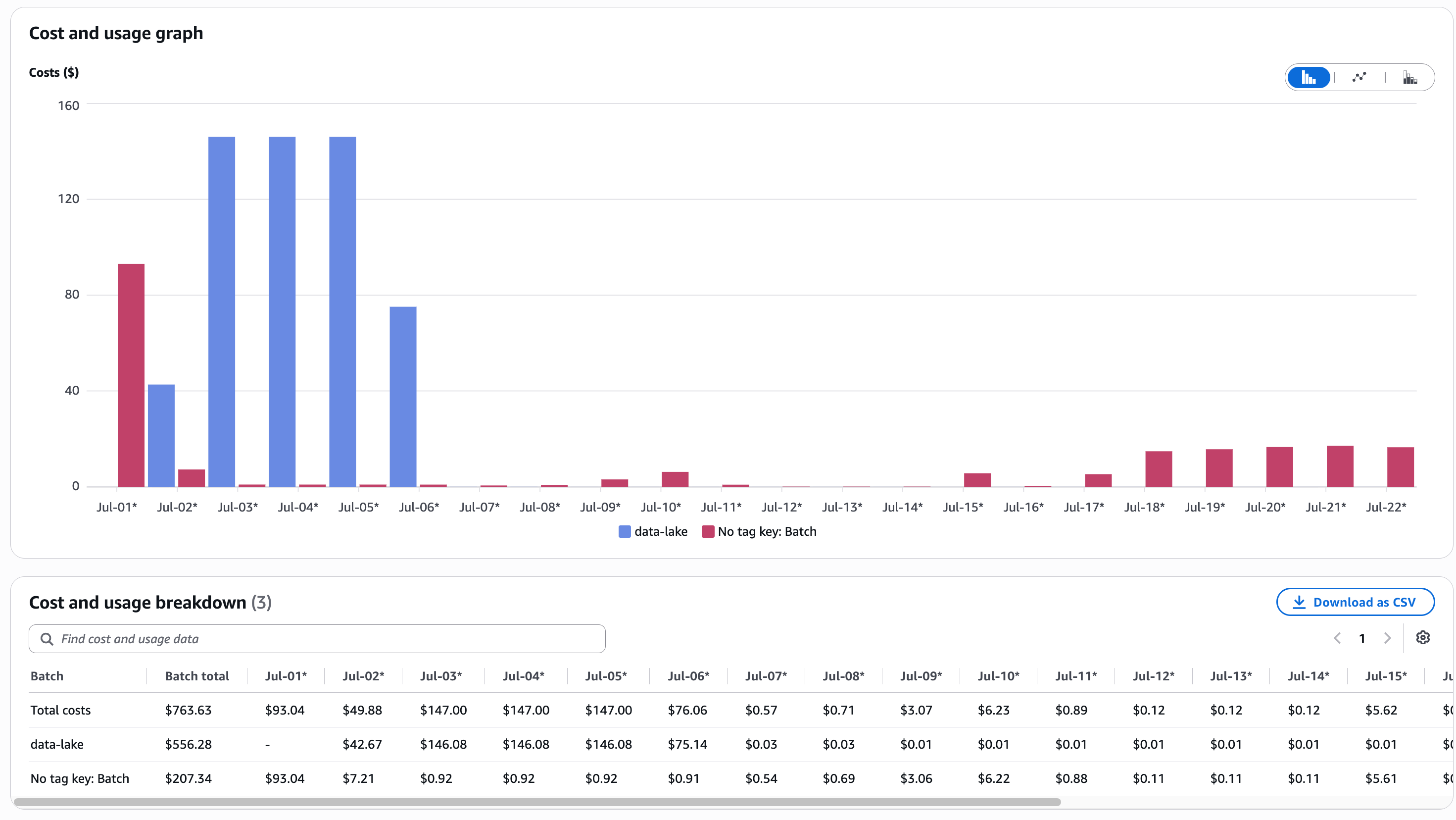
Newly-tagged resources don't retroactively carry that tag into historical cost data, at least not automatically. A cost allocation tag applies going forward from whenever the tag was actually present on the resource. If you tag a two-week-old resource today, Cost Explorer will show that resource as untagged for the two weeks before you tagged it, and tagged only from today onward. For a workshop that's been running for a week or two before anyone got around to tagging things properly (a very common sequence: build first, instrument later), that's most of the batch's actual spend showing up as unattributed.
AWS has a purpose-built answer for this: cost allocation tag backfill. It's a single account-wide request that retroactively applies current tag values to up to twelve months of historical usage, requested once every 24 hours, and it has to start from the first of a month. Run it once, and a cohort's entire cost history since day one shows up correctly grouped, instead of only the sliver of time since you got around to tagging things.
The ordering matters: tag everything first, activate the cost allocation tags, then run the backfill, and only tear down infrastructure after the backfill has actually completed. Deleting a resource before its cost history has been backfilled makes that reattribution much harder to do after the fact.
5. Historical resources need their real dates, not "today"
One trap worth calling out explicitly: when you finally get around to tagging a shared account that's accumulated resources across many past cohorts, it's tempting to stamp everything with today's date. Don't. A shared account holding resources from multiple past runs will have real creation timestamps that differ by weeks or months, and a cost dashboard that dates everything "today" will misattribute old, mostly-idle spend to whatever cohort happens to be running right now.
The fix is mechanical: pull the actual creation timestamp for anything that predates your current cohort's start date, and tag it with that date instead. It's a few extra minutes of scripting, and it's the difference between a cost dashboard you can trust and one that quietly lies to you.
6. The roster is the actual source of truth, and it has to be singular
The least "cloud" lesson of all: most of the operational pain in running a recurring workshop isn't infrastructure, it's roster drift. Who's currently enrolled, who dropped, what their cloud username is, what their collaboration-tool username is, whether they still need access. The moment that information lives in more than one place, spreadsheets, several CSVs, a couple of ad hoc exports, it starts disagreeing with itself. Usernames get typo'd. A dropout list references someone who was never actually provisioned. Offboarding turns into detective work instead of a script run.
The fix isn't more automation, it's less surface area: one roster, one file, with every identity mapped in one row (name, email, cloud username, collaboration-tool username, active flag). Every offboarding, access grant, and access revocation becomes a diff against that one file, and every automation script reads from it rather than from whatever export happened to be handy that day. Validate new entries at intake, not months later during cleanup, and the whole system stays boring in the best sense of the word.
The throughline
None of these individually are sophisticated. A tag-driven cleanup rule, an activated cost allocation tag, a single roster file, a shared sandbox IAM policy. What makes them add up to something worth writing about is that they were all born from the same pattern: a manual process worked fine at small scale, and quietly started costing real time and real money the moment the same account and the same process had to survive more than one cohort. The fix, every time, was to remove a place where humans were expected to keep two things in sync by hand, and let a script or an AWS-native mechanism own that instead.
That's the actual optimization. Not a bigger instance, not a fancier pipeline, just fewer places where drift can quietly accumulate.
Why this matters if you're evaluating a training vendor
This is the operational layer nobody asks about in a sales call, and it's usually the difference between a workshop that runs clean and one where half the cohort spends the first hour fighting IAM errors instead of building. It's also the layer that determines whether your team can actually trust the cost numbers afterward.
We built this discipline by running it against a real, shared AWS account across months of back-to-back cohorts, not in a lab. It's the same sandboxing, tagging, and cost-tracking approach behind every hands-on workshop we run, from a single AWS Data Lake day to a full-stack build. If your team is evaluating how to run production-grade cloud or AI training without turning your own account into an untracked mess, talk to us.