The Token Playbook: Why Your Dev Team Burned Its AI Budget in a Week — and the Two Disciplines That Fix It
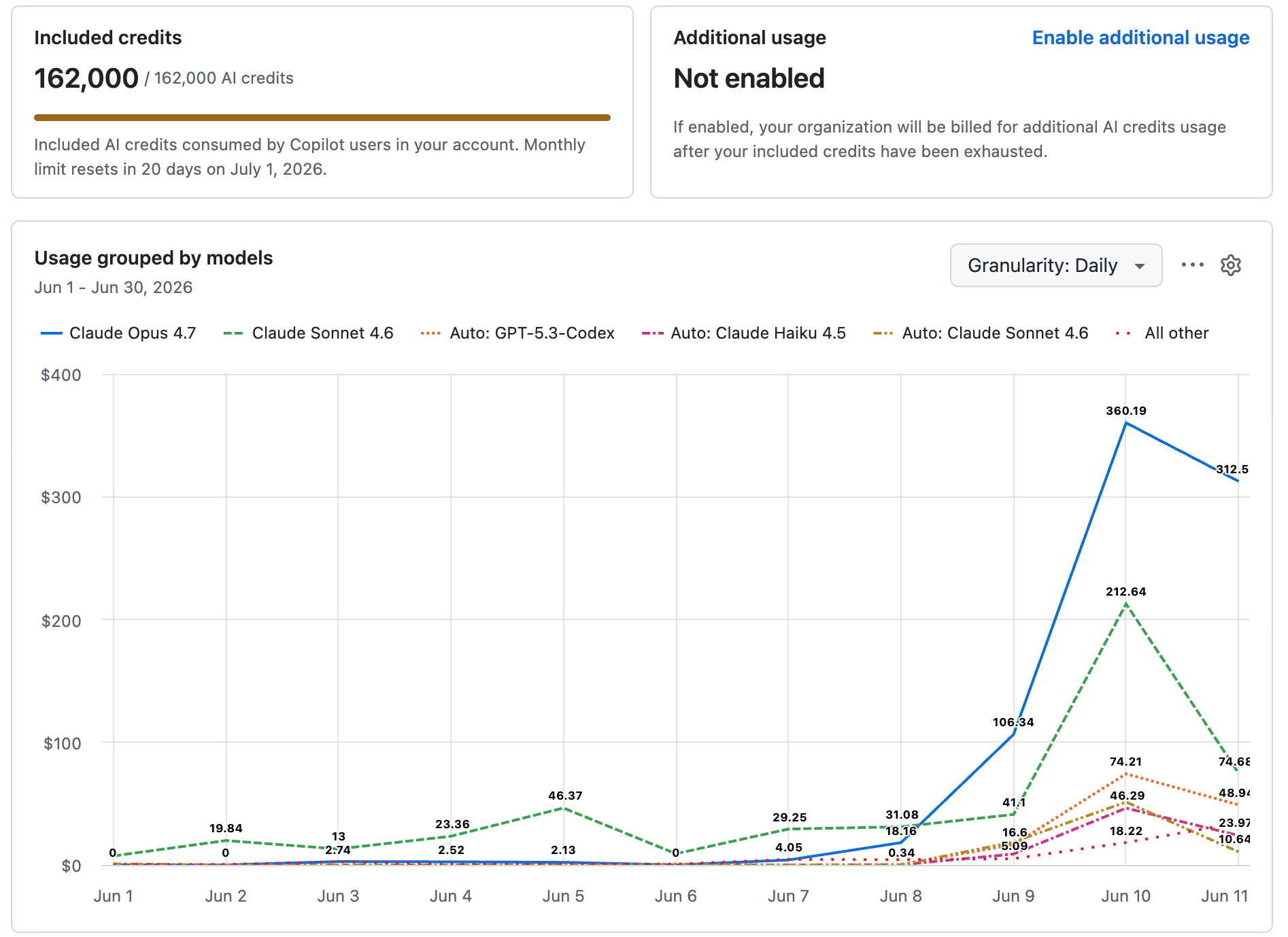
Why dev teams burn through Copilot, Claude Code, and Genie budgets in days — and the two disciplines (use the agent well, and use it only where input is non-deterministic) that bring AI spend back under control.
Fifty-four engineers in my GitHub organization exhausted their entire monthly allowance of Copilot premium requests in a matter of days.
Not weeks. Days.
And it's not just my org. Last week I was speaking with a Salesforce partner — a firm of over 100 employees — and they described the identical curve: token costs crossing their limits far faster than anyone budgeted, and at that headcount the creep compounds quickly. Fifty engineers burning inefficiently is a line item. A hundred-plus is a budget review.
If you manage a development team in 2026, some version of this is in your billing dashboard right now. The standard responses are to raise the budget or throttle the team. Both treat the symptom.
When I audited how the requests in my own org were actually being spent, the diagnosis was simple and a little embarrassing for all of us:
Developers were using a metered coding agent like a free chatbot.
"What does this error mean?" — premium request. "Explain how this library works" — premium request. A vague, half-formed task that the agent guesses wrong, followed by two clarifying re-prompts — three premium requests for one unit of work.
Chatbot questions at agent prices. That's half the token crisis in one sentence.
The other half is architectural — agents deployed inside workflows that never needed one. We'll get to that. Together they form the two disciplines of this playbook:
- Use the agent well — spend metered requests only on execution.
- Use the agent only where it belongs — and for everything deterministic, burn tokens once, not every time.
I watched this movie before — with GPUs
Before BeCloudReady, I spent roughly five years as Director of AI Platform at a neocloud — a specialized GPU cloud with 4,000+ NVIDIA A100s and H100s, serving enterprise clients running serious AI workloads.
The enterprise budget conversations followed the same script every quarter: budgets sized on optimism, consumed in weeks — and when we dug into consumption, the cause was almost never the volume of work. It was how teams worked: the biggest resource used by default, failed jobs re-run from scratch, zero training, nobody owning efficiency.
The same disease has now moved from GPU budgets to token budgets. Different meter. Same cause: tooling rolled out faster than skill.
Discipline 1: Use the agent well
The core rule: treat premium requests like ammunition. You don't fire your best rounds to check which way the wind blows. Every metered request should be spent on execution — work only that tool can do — never on thinking, exploring, or clarifying. Thinking is cheap somewhere else.
Draft cheap, execute expensive
Before I give Copilot or Claude Code a task, I build the instruction first — in ChatGPT or Gemini, where the conversation costs nothing. The scope, the files to touch, the constraints, the acceptance criteria. The messy back-and-forth and the "wait, actually" moments all happen in the free tier. Then I fire the finished instruction into the metered agent. One precise shot instead of five re-prompts.
The exact prompt I use:
"I'm about to hand a task to a coding agent (GitHub Copilot agent mode / Claude Code). Help me write a precise, self-contained instruction so it succeeds in one attempt. My goal: [describe the feature/fix in plain language] Stack and repo context: [language, framework, relevant directories/files] Constraints: [what must not change, style rules, dependencies to avoid] Write the agent instruction with: (1) exact scope, (2) files to create or modify, (3) constraints and what NOT to touch, (4) acceptance criteria I can verify. Under 250 words. Ask me clarifying questions first if anything is ambiguous."
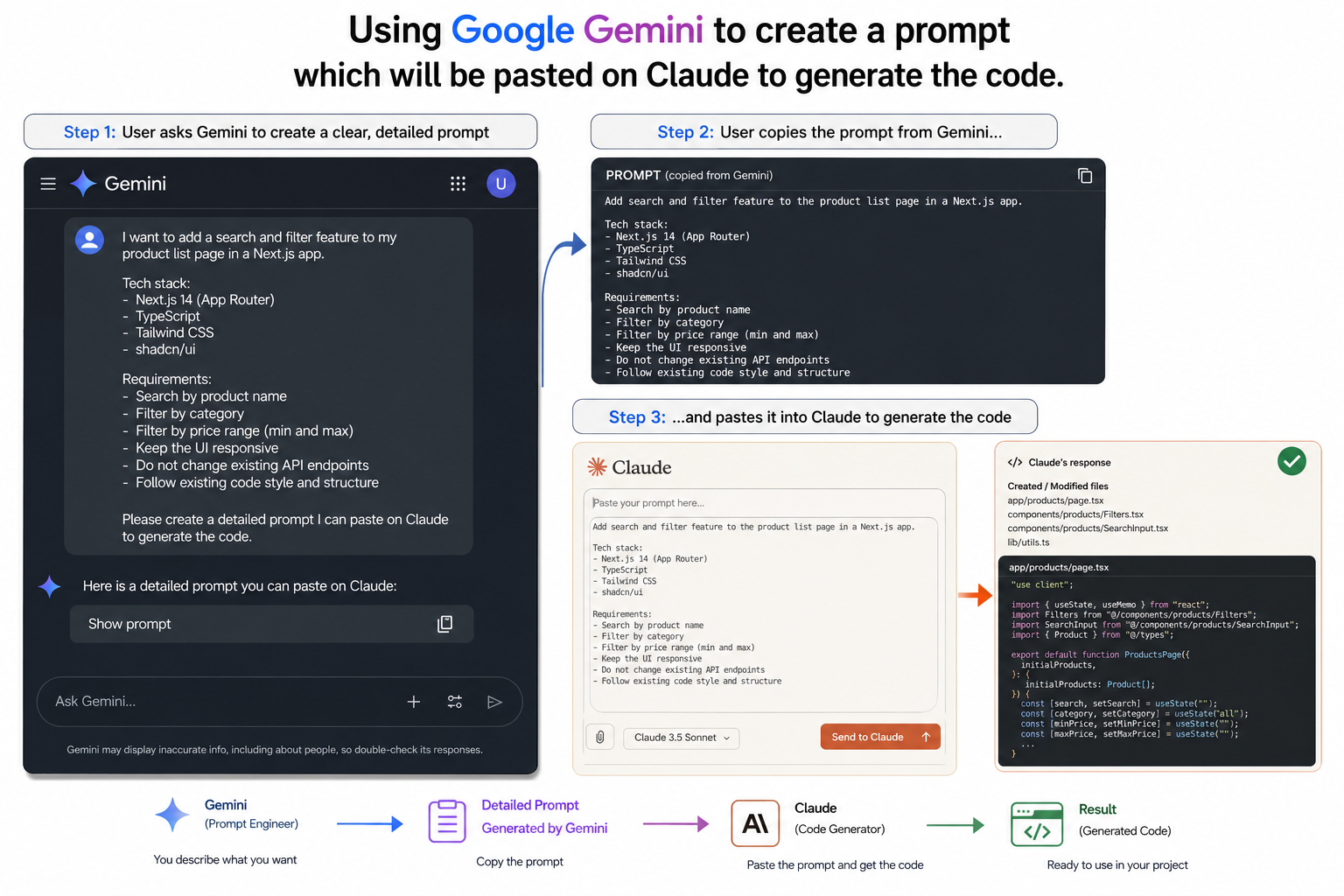
The clarifying questions you answer in Gemini for free are the same ones the agent would have guessed wrong about at full price.
Q&A lives in chatbots, not agents
Understanding an error. Learning an API. Comparing approaches. That's conversation, and conversation belongs in ChatGPT or Gemini, where the free tiers are generous (Gemini's especially). The agent is for executing changes to your codebase. The moment you catch yourself asking the agent a question instead of giving it an instruction, you're paying execution prices for conversation.
My triage prompt, used before any agent request:
"Here's an error and the relevant code. (1) Diagnose the most likely root cause. (2) If the fix is a one-liner or contained in this snippet, just give me the fix. (3) Only if the fix genuinely spans multiple files, write a coding-agent instruction for it: scope, files, constraints, acceptance criteria."
Most "agent tasks" die at step 2. The free model fixes them, and the metered agent never gets invoked at all.
Decompose big tasks before executing
One oversized agent task is how you get runaway burn — the agent loops, retries, re-reads the repo. Before any multi-step task:
"Break this feature into the smallest independent tasks a coding agent can each complete in a single run: [feature]. Order them by dependency. For each, write a one-paragraph agent instruction with scope, files, and acceptance criteria."
The pattern works beyond code
I apply draft-cheap-execute-expensive to image generation too: ChatGPT writes the detailed image prompt — composition, style, palette, text — and I fire that finished prompt into Gemini to render. The expensive or quota-limited step always receives a finished input, never a rough draft.
Discipline 2: Use agents where they're needed — not where you want them
This is the discipline that separates a prompting tip from an architecture decision, and it's where the real money is.
Here's the uncomfortable observation: most business workflows are deterministic. Pull yesterday's orders. Reconcile them against payments. Flag the exceptions. Email the report. Same inputs, same expected outputs, every single run. There is no judgment in that loop.
And yet the current fashion is to wire an agent — or a chain of agents — into exactly these workflows. Every time that workflow runs, you pay for LLM inference. The agent re-reasons through the same steps it reasoned through yesterday, burns the same tokens, and — because LLMs are stochastic — occasionally produces a different answer to the same question. You've paid a premium for unreliability.
The efficient design: use the coding agent to WRITE the app, then run the app.
Have Copilot or Claude Code build the deterministic version — the Python script, the Lambda, the scheduled job — that implements the workflow as ordinary code. You burn tokens once, at build time. Then the workflow runs forever on plain compute.
The mnemonic I teach:
An agent in the loop burns GPU on every run. Code in the loop burns CPU on every run — and CPU is effectively free.
Run the numbers on any daily workflow and the gap is absurd: an agent chain invoked 365 times a year pays inference 365 times; the generated script pays inference once and pennies of compute thereafter. And the script gives you something no agent chain can — the same output every time, which is what a business workflow is for.
So when DO you put an agent in the loop?
One test: is the input non-deterministic?
- If the workflow receives the same shape of input every run and must produce an exact, expected output — write code. (Use AI to write it; that's what the coding agent is for.)
- If each run receives arbitrary human language, novel situations, or judgment calls that can't be enumerated in advance — that's an agent's job.
This test is exactly why text-to-SQL is a legitimate runtime agent and your nightly reconciliation job is not. An ad-hoc question from a business user — "why did margin dip in the Ontario accounts last quarter?" — is non-deterministic input by definition. No pre-written script can anticipate it. That's where the LLM earns its inference cost.
But even where an agent is justified, the cost discipline doesn't disappear — it moves into the architecture: retry ceilings, context budgets per call, cost checks before expensive operations. An agent without ceilings is an unbounded spending loop with a friendly interface.
The same problem, one layer up: your data tools
Everything above assumes you can see the meter. In your data platform, often you can't.
Take Databricks Genie (and its equivalents elsewhere): natural-language questions answered from your lakehouse, with the LLM bundled inside the platform. Convenient — and opaque by design. You don't choose the model. You can't route simple questions to a cheaper one. You can't set token ceilings or retry limits. And the AI consumption arrives entangled with your compute billing, so when spend climbs, you can't isolate which decision caused it.
This is the architectural reason I built — and still teach with — db-agent, my open-source text-to-SQL agent (AAAI-25 workshop): it separates your data infrastructure from your LLM infrastructure. The database lives on one side, the model on the other, and you own the boundary. That separation buys you three things the bundled tools can't:
- Governance. You choose the model — on-prem open-weight, your own cloud deployment, whatever your compliance posture requires — with your audit trail on every crossing of the boundary.
- Billing. LLM spend becomes its own visible cost center, not a mystery line inside platform compute.
- Token management. Your quotas, your model routing, your ceilings — Discipline 2's cost controls, enforced in architecture instead of relying on good behavior.
The native tools are fine until the bill, the auditor, or the budget review arrives. The teams that stay in control are the ones that kept the boundary.
Watch it built, live
The most concrete way I know to show both disciplines working is to build the system in front of you.
I run a free 45-minute live session where I deploy a text-to-SQL AI agent on a real Databricks workspace — with the data/LLM boundary explicit and the complete cost-guardrail layer installed live: statement allowlists, query cost checks, retry ceilings, context budgets. Every token-spending decision, narrated as I make it.
Register for the free live session →
For data teams that want the full version: the same build, done by your engineers on your Databricks workspace over two days — Unity Catalog scoping, the complete guardrail layer, deployed and yours to keep — is the private workshop I run for engineering teams. The free session is the honest preview.
Chandan Kumar is the founder of BeCloudReady and organizer of the TorontoAI community (10,000+ members). He previously spent ~5 years as Director of AI Platform at a neocloud with 4,000+ NVIDIA A100/H100 GPUs, and is the creator of the open-source db-agent project (AAAI-25).